Common Settings

These settings are common in most of the designs and hence, have the same working.

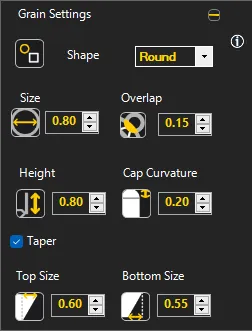
Grain Settings

• Shape – Choose between Round, Square or Combination of round up and square bottom
• Height – Height of Prong / Pavé above the surface
• Cap Curvature – Fillet required on the cap
• Size – Base size of the Prong / Pavé
• Overlap – Overlap of Prong / Pavé over the gem
• Taper – Check if you need Tapered Pavé
    o Specify top diameter
    o Specify base size
Grain Setting

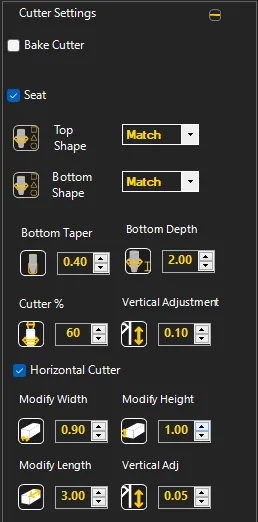
Cutter Settings

• Seat – Creates a chamfer at the surface where gem placed
• Top Shape – Cutter shape can be the shape of the gem or round or square causing seat also to modify
• Bottom Shape – Cutter shape from the bottom can be same as gem shape or morphed to round, square or azure cut
• Top Height – Cutter height above metal
• Bottom Depth – Cutter depth below the top metal surface. It should preferably be slightly more than the surface thickness.
• Cutter % – Percentage reduction in cutter size as per gem size
• Vertical Adjustment – Cutter placement above the metal surface
• Bottom Taper – % taper of the cutter

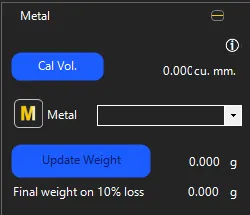
Metal

  • Cal Vol. – Click on Calculate Volume button first
  • Metal – Select the metal type based on metal and it’s purity
             o Weight in CAD – Weight of metal as per the density is calculated in CAD
             o Final Weight after loss calculation – Weight as appropriated after production is calculated. The % can be set in Default Settings